Introduction
For the past year I've been dual booting windows 10 and fedora. Ideally, I would have only used fedora, however I needed windows 10 for software that's not compatible with linux.
After a while, I found that I mostly used windows. It was pain to move files between each OS and the inconvenience of rebooting to switch between them made dual booting unviable.
Enter Virtualisation
Wait, so you're telling me that I can have a computer in my computer? That means I don't have to dual boot and I can get the best of both worlds, right?
Well, No. It's not quite that simple...
Virtual Machines are great, but they can be slow. When you run a VM your computer's resources have to be shared between the guest os and the host os. What slows down virtual machines even more is the lack of gpu acceleration. Gpu acceleration can offload lots of simple operations from the cpu to the graphics card (or integrated graphics). Instead of flooding the cpu with lots of basic operations, it's handled by hardware that is more suited to those calculations. This is really handy for software that are graphic-intensive (like adobe after effects).
A big issue with Virtualization is that you cannot currently section off a part of your graphics card to a virtual machine in the same way you can with your cpu (Unless you use expensive industry-grade hardware [1] ). This means that unless you pass through a whole graphics card, the virtual machine will have to rely on your cpu to process graphics. This combined with an emulated graphics adapter makes it practically impossible to use a virtual machine to do stuff like video editing.
What are the options?
Suck it up and continue dual booting
Dual booting is quick and easy. You can use whatever operating systems you like and everything will run as expected. But it can be inconvenient to move stuff between each OS.
Try single GPU passthrough
This approach detaches and passes through your gpu when you start the vm and theoretically reattaches it to your host os after you close the vm. I have not been able to get this to work properly. When I did successfully get the graphics card to be taken over by the vm, I ran into multiple issues (and for some reason memory wasn't being allocated properly).
Use a second graphics card
Use integrated graphics / graphics card for the host OS and then pass through an extra graphics card to the vm. Takes a little bit of setup but is a reliable solution. By having the output of each graphics card go into the same monitors it's pretty painless to switch between the host and guest os.
My attempt at gpu passthrough
To get virtualization and gpu passthrough to work, you need to first enable virtualization (AMD SVM) and I/ommu (AMD VI) in the bios. Iommu stands for input-output memory management unit. It's needed because a guest os isn't loaded in memory at address zero because that's where the host os is. This means that memory addresses in the guest os don't line up with actual memory addresses. From my understanding, I/ommu allows a device to be referenced with a virtual address which will then be directed to the device's physical address.
So with fresh enthusiasm, I looked up a tutorial and started setting things up. All was well until I tried to pass my graphics card through.
for g in /sys/kernel/iommu_groups/*; do echo "IOMMU Group ${g##*/}:"; for d in $g/devices/*; do echo -e "\t$(lspci -nns ${d##*/})"; done; done
IOMMU Group 0:
    00:01.0 Host bridge [0600]: Advanced Micro Devices, Inc. [AMD] Renoir PCIe Dummy Host Bridge [1022:1632]
IOMMU Group 1:
    00:01.1 PCI bridge [0604]: Advanced Micro Devices, Inc. [AMD] Renoir PCIe GPP Bridge [1022:1633]
IOMMU Group 10:
    03:00.0 VGA compatible controller [0300]: Advanced Micro Devices, Inc. [AMD/ATI] Navi 14 [Radeon RX 5500/5500M / Pro 5500M] [1002:7340] (rev c5)
IOMMU Group 11:
    03:00.1 Audio device [0403]: Advanced Micro Devices, Inc. [AMD/ATI] Navi 10 HDMI Audio [1002:ab38]
IOMMU Group 12:
    04:00.0 USB controller [0c03]: Advanced Micro Devices, Inc. [AMD] Device [1022:43ec]
    04:00.1 SATA controller [0106]: Advanced Micro Devices, Inc. [AMD] Device [1022:43eb]
    04:00.2 PCI bridge [0604]: Advanced Micro Devices, Inc. [AMD] Device [1022:43e9]
    05:00.0 PCI bridge [0604]: Advanced Micro Devices, Inc. [AMD] Device [1022:43ea]
    05:02.0 PCI bridge [0604]: Advanced Micro Devices, Inc. [AMD] Device [1022:43ea]
    05:03.0 PCI bridge [0604]: Advanced Micro Devices, Inc. [AMD] Device [1022:43ea]
    06:00.0 VGA compatible controller [0300]: Advanced Micro Devices, Inc. [AMD/ATI] Ellesmere [Radeon RX 470/480/570/570X/580/580X/590] [1002:67df] (rev cf)
    06:00.1 Audio device [0403]: Advanced Micro Devices, Inc. [AMD/ATI] Ellesmere HDMI Audio [Radeon RX 470/480 / 570/580/590] [1002:aaf0]
    07:00.0 Network controller [0280]: Realtek Semiconductor Co., Ltd. RTL8192EE PCIe Wireless Network Adapter [10ec:818b]
    08:00.0 Ethernet controller [0200]: Realtek Semiconductor Co., Ltd. RTL8111/8168/8411 PCI Express Gigabit Ethernet Controller [10ec:8168] (rev 16)
IOMMU Group 13:
    09:00.0 Non-Essential Instrumentation [1300]: Advanced Micro Devices, Inc. [AMD] Zeppelin/Raven/Raven2 PCIe Dummy Function [1022:145a] (rev c8)
IOMMU Group 14:
    09:00.1 Audio device [0403]: Advanced Micro Devices, Inc. [AMD/ATI] Renoir Radeon High Definition Audio Controller [1002:1637]
IOMMU Group 15:
    09:00.2 Encryption controller [1080]: Advanced Micro Devices, Inc. [AMD] Family 17h (Models 10h-1fh) Platform Security Processor [1022:15df]
IOMMU Group 16:
    09:00.3 USB controller [0c03]: Advanced Micro Devices, Inc. [AMD] Renoir/Cezanne USB 3.1 [1022:1639]
IOMMU Group 17:
    09:00.4 USB controller [0c03]: Advanced Micro Devices, Inc. [AMD] Renoir/Cezanne USB 3.1 [1022:1639]
IOMMU Group 18:
    09:00.6 Audio device [0403]: Advanced Micro Devices, Inc. [AMD] Family 17h (Models 10h-1fh) HD Audio Controller [1022:15e3]
IOMMU Group 2:
    00:02.0 Host bridge [0600]: Advanced Micro Devices, Inc. [AMD] Renoir PCIe Dummy Host Bridge [1022:1632]
IOMMU Group 3:
    00:02.1 PCI bridge [0604]: Advanced Micro Devices, Inc. [AMD] Renoir/Cezanne PCIe GPP Bridge [1022:1634]
IOMMU Group 4:
    00:08.0 Host bridge [0600]: Advanced Micro Devices, Inc. [AMD] Renoir PCIe Dummy Host Bridge [1022:1632]
IOMMU Group 5:
    00:08.1 PCI bridge [0604]: Advanced Micro Devices, Inc. [AMD] Renoir Internal PCIe GPP Bridge to Bus [1022:1635]
IOMMU Group 6:
    00:14.0 SMBus [0c05]: Advanced Micro Devices, Inc. [AMD] FCH SMBus Controller [1022:790b] (rev 51)
    00:14.3 ISA bridge [0601]: Advanced Micro Devices, Inc. [AMD] FCH LPC Bridge [1022:790e] (rev 51)
IOMMU Group 7:
    00:18.0 Host bridge [0600]: Advanced Micro Devices, Inc. [AMD] Cezanne Data Fabric; Function 0 [1022:166a]
    00:18.1 Host bridge [0600]: Advanced Micro Devices, Inc. [AMD] Cezanne Data Fabric; Function 1 [1022:166b]
    00:18.2 Host bridge [0600]: Advanced Micro Devices, Inc. [AMD] Cezanne Data Fabric; Function 2 [1022:166c]
    00:18.3 Host bridge [0600]: Advanced Micro Devices, Inc. [AMD] Cezanne Data Fabric; Function 3 [1022:166d]
    00:18.4 Host bridge [0600]: Advanced Micro Devices, Inc. [AMD] Cezanne Data Fabric; Function 4 [1022:166e]
    00:18.5 Host bridge [0600]: Advanced Micro Devices, Inc. [AMD] Cezanne Data Fabric; Function 5 [1022:166f]
    00:18.6 Host bridge [0600]: Advanced Micro Devices, Inc. [AMD] Cezanne Data Fabric; Function 6 [1022:1670]
    00:18.7 Host bridge [0600]: Advanced Micro Devices, Inc. [AMD] Cezanne Data Fabric; Function 7 [1022:1671]
IOMMU Group 8:
    01:00.0 PCI bridge [0604]: Advanced Micro Devices, Inc. [AMD/ATI] Navi 10 XL Upstream Port of PCI Express Switch [1002:1478] (rev c5)
IOMMU Group 9:
    02:00.0 PCI bridge [0604]: Advanced Micro Devices, Inc. [AMD/ATI] Navi 10 XL Downstream Port of PCI Express Switch [1002:1479]
The graphics card I wanted to pass to my vm is in IOMMU group 12. Along with 4 other devices. The graphics card I wanted to use for my host is in it's own IOMMU groups. (10,11). What this basically means is that with my motherboard, I can only pass the device that in the pcie slot that goes straight through to the cpu (the one closest to it). The pcie slot that goes through the A520 chip is bundled in the same iommu group as the Ethernet adapter, sata connectors and some usb ports.
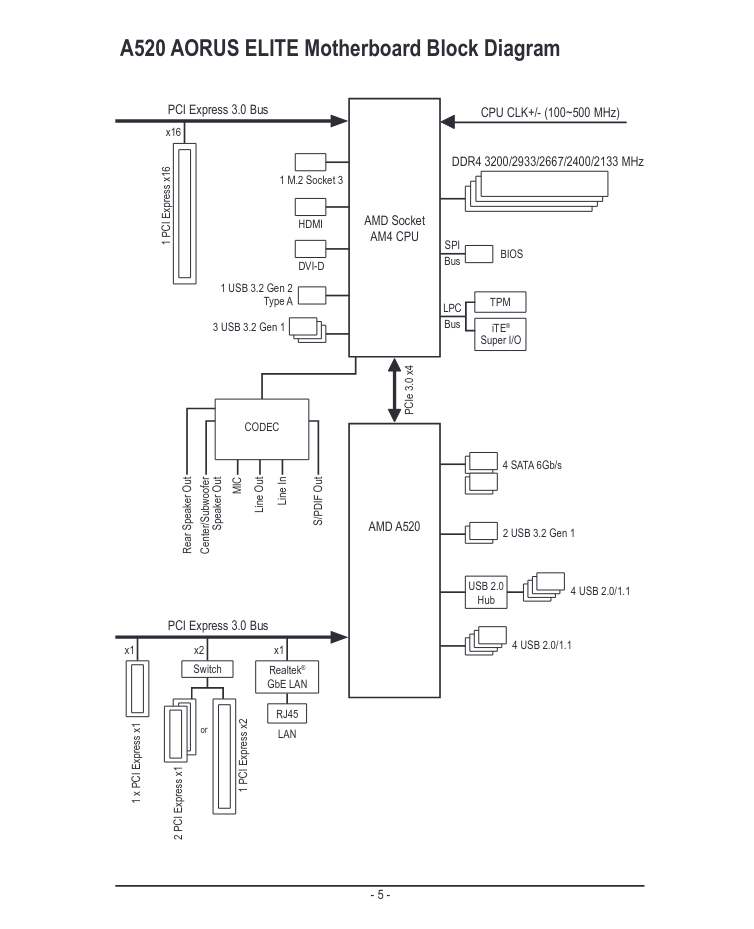
Additionally, and I think this may be an issue with the linux kernel, all of my usb ports that go through the A520 chip don't work. (I can only use the four usb ports that go directly to the cpu).
A possible solution
If your iommu groups aren't great, you can apply the acs patch to your kernel. It allows you to split iommu groups at a software? level. Don't ask me how it works. I tried it, but couldn't get it to work.
A compromise
I couldn't pass my bottom graphics card through. So I made the host OS use the bottom gpu allowing the top one to be used by the VM. This involved choosing the primary graphics output in the bios to the bottom card.
Now, whenever I start my computer, I need to make sure no video cables are plugged into the top card, otherwise fedora would default to it when booting. Before I start the VM, I have to re-plug those cables in.
An easy fix
Much to the dismay of my bank account, I've ordered a new motherboard (Gigabyte X570 UD). It uses the X570 chip-set which has full IOMMU support. This should fix a lot of issues I've been having.
- see Single Root I/O Virtualization